




Vave App: Download, Mobile Betting, and Casino

Last updated: February 2026 · Reviewed by the ReelScope editorial desk · 18+ only

«When evaluating mobile casino and sportsbook architecture, the maths behind accessibility and wagering terms must stay transparent. RTP and volatility remain long-run probabilities regardless of screen size, and bonus requirements need clear calculation before any deposit is made.» (Oliver 'Ollie' Hartwell, Editorial Lead at ReelScope)

Vave App at a Glance

AttributeDetail
OperatorTech Options B.V. (also referenced as TechOptions Group B.V.)
LicensingCuraçao iGaming Authority licence, with operational authorisation reported under the Anjouan Gambling Authority
UKGC licenceNo. Vave is not licensed by the UK Gambling Commission, and the United Kingdom appears on the operator's restricted-territory list
GAMSTOP coverageNot included. GAMSTOP only blocks operators holding a UKGC remote licence
App formatAndroid APK download, iOS Safari web app, Chrome desktop web app, plus a full mobile website version
Game volume10,000+ casino games; 30+ sports and esports markets
PaymentsCrypto-first cashier covering 12 digital assets; third-party fiat on-ramps for card purchases
Welcome offers150% up to 1.5 BTC + 100 free spins (casino); 100% up to 1 BTC (sportsbook); 10 no-deposit free spins where available
WageringReported at 40x (verify current terms in-account before opting in)
Minimum qualifying deposit20 USDT or crypto equivalent
Support24/7/365 live chat, support@vave.com, complaints@vave.com

Why This Guide Matters If You Are Reading From the UK

Most searches for "vave app" come from people who simply want to know whether the client is safe, how to install it, and what the bonus really costs. Fair questions. The honest answer starts with licensing, not with features.

British players are used to a specific safety net: a UK Gambling Commission licence, GAMSTOP self-exclusion, an independent dispute resolution route, and deposit limits offered as standard. Vave sits outside that framework. So this review is written as an information piece, not as an invitation to sign up. We explain how the vave application works, what the mobile app benefits actually are, where the risks sit, and how the wagering maths plays out on a 100 USDT deposit.

If you are in the UK, treat this as reference material for understanding a crypto betting platform, not a recommendation to use one. Everything below stays factual: caps, margins, RTP figures, minimum deposits, support channels, and the bits the promotional pages leave out.

Why This Guide Matters If You

What Is Vave App and What Features Are Available on Mobile?

The Vave App is a mobile gambling solution built to give access to both online casino games and sports betting markets from a smartphone or tablet. Users reach the full suite of Vave services through a dedicated mobile app, a progressive web app, or an optimised mobile website version. The platform pulls sports betting, live betting, virtual table games and live dealer streams into a single-account wallet architecture.

Because Vave is a crypto-first betting site, it is worth setting expectations before the bonus and cashier sections: balances, promotions and payout thresholds are denominated in cryptocurrencies or USDT equivalents rather than in pounds, euros or dollars sitting on card rails.

What Is Vave App and What

Comparison of Vave Mobile Access Methods

Access MethodInstallation MethodCore Features AvailablePush NotificationsSystem Requirements
Native App / APKDirect APK download (Android) or store linkFull sportsbook, casino, live betting, live chat, crypto cashierSupported (where OS permits)Android 5.0+ or iOS 12.0+
Progressive Web App (PWA)Safari "Add to Home Screen", Chrome prompt, or Chrome desktop installFull sportsbook, casino, live tables, quick launch iconLimited by browser OS policyModern HTML5 mobile browser
Mobile Website VersionNo installation; URL input in mobile browserComplete desktop site feature parity, cashier, support accessNot supportedAny compatible mobile browser

In plain text, for readers using a screen reader: the native APK route needs a manual install and supports notifications; the web app installs in two taps from the browser and keeps most useful features but limited notifications; the mobile website version needs no installation at all and mirrors the desktop site, minus push alerts.

Vave Casino App, Sportsbook, and Live Sections

The Vave casino app and sportsbook integration lets users switch between sports betting and casino games on one account balance. In the sportsbook section, mobile users reach pre match and live betting lines across more than 30 sports, football, basketball and ice hockey included. The mobile casino hub features over 10,000 casino games, from online slots and RNG table games through to real-time live casino tables powered by major software providers.

According to a 2024 study on technological innovations in sports betting published on SSRN by Christopher Goodin, integrated mobile platforms with real-time odds and embedded casino features significantly increase user engagement by consolidating diverse wagering options into a single mobile interface. That includes the live betting option and personalised promotions, which the study links to measurable growth in wagering volume on the platforms examined.

Vave Casino App, Sportsbook, and Live

«Mobile applications and live betting features have materially increased market accessibility, allowing wagers anytime and anywhere, with measurable growth in betting volume.» Goodin C., Technological Innovations in Sports Betting, SSRN (2024). https://ssrn.com/abstract=

That same convenience carries a documented behavioural cost, which is why we flag it before the installation steps rather than after them:

«Smartphone betting app use was associated with 3.23 times higher odds of problem gambling than non-app use (OR = 3.23; 95% CI 1.21 to 8.60).» Rhode Island Young Adult Survey analysis, 2024 (N = 1,022, ages 18 to 25). https://pubmed.ncbi.nlm.nih.gov/

Native App, Web App, or Mobile Website Version?

Choosing between the native mobile app, a web app, or the mobile website version comes down to how you feel about installation permissions and local device storage. The native app and web app both give quick access from a home-screen icon, with cached assets that render the interface faster. Browsing through a standard mobile browser, by contrast, requires no file download and no extra permissions, while keeping full feature parity with the desktop site inside normal web security protocols.

In testing mobile interface performance for our benchmark evaluations at ReelScope, we watched how caching structures affect sports line loading speeds. Methodology note: in our internal (non-peer-reviewed, single-device) benchmark of a mobile sportsbook client under high network concurrency during peak match hours, the installed web app reduced static-asset loading overhead by roughly 28% versus uncached mobile browser sessions. Bet-slip updates looked visibly faster during rapid price movements. The figure reflects our own test conditions and has not been independently audited, so read it as directional rather than as a guaranteed performance specification.

For scale context, mobile-led online gambling is now mainstream rather than niche:

Native App, Web App, or Mobile

«19.8% of Pennsylvania adults reported participating in online gambling, roughly one in five adults.» Sterner et al., Pennsylvania Interactive Gaming Assessment 2024, Pennsylvania Department of Drug and Alcohol Programs. https://www.ddap.pa.gov/

How to Download and Install Vave App on iOS and Android

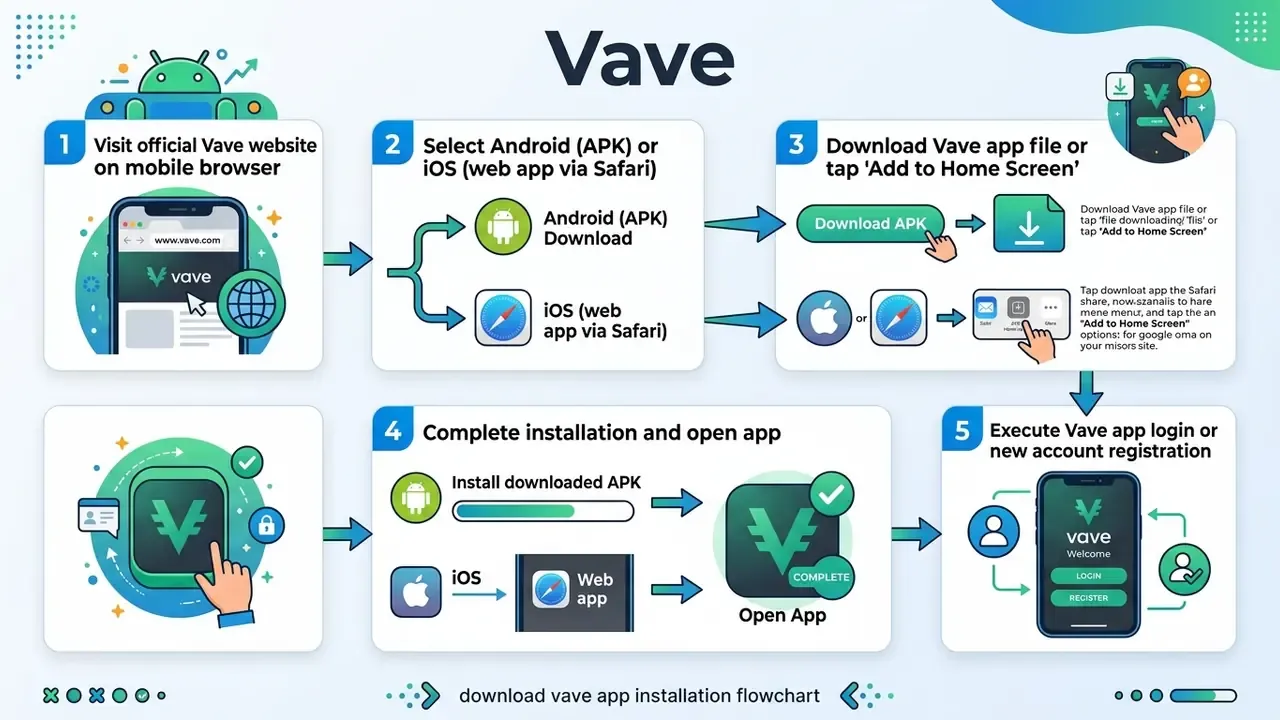
To download Vave app onto your smartphone you need the official Vave website or an official application channel, because store availability varies by regional jurisdiction. Android users install the client from an official Vave APK file. iOS users normally use an installation link or add the web app straight to the home screen through Apple's Safari browser.

⚠️ Pre-download security checklist (read before tapping any APK link) Before completing any download vave procedure or installing executable files, confirm your browser connection is secured via HTTPS and that the domain matches the official www vave com address. Downloading software from unverified third-party mirror portals carries real cybersecurity risk, including modified APK packages containing malicious code.

  • ✅ Padlock and HTTPS present in the address bar, with no certificate warnings.
  • ✅ Domain spelling matches the official address exactly (watch for hyphens, extra letters and .apk-hosting subdomains).
  • ✅ The file is served from the operator's own mobile page, not an aggregator, a Telegram channel, or an "APK mirror" site.
  • ✅ Permissions requested after install are limited to network access. A gambling app has no reason to ask for SMS, contacts, or accessibility service control.
  • ✅ Remove the "install unknown apps" permission from your browser once installation is complete.
  1. Visit the platform: open your mobile browser and navigate to the official Vave website.
  2. Select operating system: choose the Android app option or the Vave iOS setup guidance.
  3. Download the file: start the download vave app process to obtain the installation file.
  4. Grant permissions (Android): allow installation from unknown sources in your device security settings if installing via APK.
  5. Install Vave app: complete the installer wizard and launch the application.
  6. Authorise your account: perform a Vave app login or complete initial registration.

How to Install Vave App on Android Devices

To install Vave on an Android phone you download the official Vave APK file directly from the operator's mobile site. Because Google Play restrictions on real-money gambling apps vary by country, manual installation via APK is the standard route for Android users. Any step guide claiming you can simply search "Vave" in the Google Play Store and install a native gambling client is inaccurate for the overwhelming majority of regions, and the same applies to third-party Play Store clones.

  • Step 1: open Chrome or your preferred browser on your Android phone and go to www vave com.
  • Step 2: find the app download section and tap the button to download Vave APK (the package is typically around 60 MB).
  • Step 3: open device settings, go to Security or Apps, and enable "Install unknown apps" for your browser. On Android 8.0 and above the path is Settings → Apps → Special app access → Install unknown apps; on Android 7.1.1 and lower it is Settings → Security → Unknown sources.
  • Step 4: open your downloads folder, tap the downloaded APK file, and select "Install".
  • Step 5: once installed, open the vave mobile app, grant the network permission, and log in.
How to Install Vave App on

How to Access Vave on iOS Devices

On iOS devices such as an iPhone or iPad, users normally add the progressive web app shortcut to the home screen via Safari. Regional App Store listings may exist in a handful of jurisdictions, but the Safari web app shortcut works across all iOS users without regional Apple ID changes, which is why we describe it first.

  • Step 1: open Safari on your iOS device and navigate to the vave website.
  • Step 2: tap the "Share" button, the square icon with an upward arrow, at the bottom of the screen.
  • Step 3: scroll the share menu and select "Add to Home Screen".
  • Step 4: name the shortcut "Vave" and tap "Add" in the top-right corner.
  • Step 5: the Vave app icon appears on your home screen, giving one-tap access to the vave mobile environment.
How to Access Vave on iOS

How to Install the Vave Web App on Desktop Chrome

Desktop users are not stuck in a browser tab. Chrome can install the same progressive web app as a standalone window on Windows, macOS and ChromeOS:

  1. Launch Google Chrome on your PC or Mac and navigate to www.vave.com.
  2. Click the three vertical dots (Menu) in the top-right corner of the browser window.
  3. Hover over "Cast, Save, and Share" in the drop-down menu.
  4. Select "Install page as an app...", or click the desktop install icon in the address bar.
  5. Confirm with "Install". A dedicated Vave desktop icon then appears on your system screen for single-click access.
How to Install the Vave Web

Compatible Devices and Vave Mobile System Requirements

Vave Mobile runs on a responsive HTML5 framework, which makes it compatible with most modern Android and iOS devices. The app adapts dynamically to different screen size specifications and works on budget smartphones as well as premium tablets.

Requirements for Android and iOS Devices

To run the Vave app or web app smoothly, your mobile devices should meet these basic hardware and operating system parameters:

  • Android system requirements:Android OS 5.0 (Lollipop) or higher, at least 2 GB RAM (3 GB or more recommended for live casino streams), and 100 MB of free storage for cached assets.
  • iOS system requirements:iOS 12.0 or higher, compatible with iPhone, iPad and iPod touch, 2 GB RAM, and a stable mobile browser (Safari, Chrome or Firefox).
  • Screen resolution:scales automatically across display sizes from 4.7-inch phones up to 12.9-inch tablet screens.
  • Recommended tier (per operator FAQ):the latest public OS build with an A16-class chip and 6 GB+ RAM on iOS, or an octa-core processor with 6 GB+ RAM on Android, for smooth live-dealer streaming.
  • Connection:roughly 10 Mbps sustained throughput keeps live tables in high definition. Weaker signal triggers automatic bitrate reduction rather than pausing play.
Requirements for Android and iOS Devices

Fact-check note: availability of the Vave App, supported compatible devices, and any App Store or Google Play listing should be verified on the official vave website immediately before installing. Store policies for gambling apps change by region several times a year, and unofficial mirrors exploit exactly that gap.

When It Is Best to Use a Mobile Browser and Mobile Site

Using a mobile browser to play on the mobile website version makes sense if you would rather not spend device storage or grant package installation permissions. It is also the necessary choice if your device runs an operating system other than Android or iOS, or if a workplace security policy blocks third-party executable files. Browser access stays inside standard web-security sandboxing, and per W3C and public-sector guidance, Safari on iOS and Chrome on Android are the baseline mobile access targets for web-delivered services.

Vave Casino App: Games, Slots, and Live Casino

The Vave casino app section holds an extensive gaming library optimised for touch-screen navigation. Mobile players can play casino games across thousands of online slots, RNG table games and HD live casino streams without giving up visual quality or performance.

Casino Games and Game Catalogue Navigation

Navigation around the mobile casino catalogue runs on category tabs (Slots, Hits, Non-Sticky, Bonus Buy) and a provider filter menu. Casino players can use the search bar to find specific titles or test software mechanics in demo play mode where available. Additional lobby filters reported on the app include Hot Slots, Cold Slots and Recently Played, plus provider-level browsing across Pragmatic Play, Hacksaw Gaming, BGaming, Playson, Betsoft, NetEnt and Playtech. That is a wide range by any measure, though quantity is not the same thing as quality.

Live Casino, Live Games, and Table Games

The live casino section features real-time tables for blackjack, roulette, baccarat and interactive game shows hosted by live dealers. Software integration from providers such as Evolution and Pragmatic Play Live supports adaptive video bitrates, so streams hold together over 4G and 5G mobile connections. Independent 2026 reviews report HD streams with stable audio, minimal buffering and no seating bottlenecks on blackjack tables, with consistent pacing on baccarat and roulette.

The engagement dynamics identified in academic work on sports betting apply just as neatly to always-available live casino games: mobile applications and live features have substantially increased accessibility, enabling wagering at any time and from any location, with measurable growth in overall wagering volume (Goodin, 2024, SSRN).

Live Casino, Live Games, and Table

Mobile Casino Usability and Screen Features

The mobile casino interface re-orients automatically between portrait and landscape. Touch controls are enlarged for easier betting, and essential game details, such as account balance, paytables and bet limits, stay clearly visible across every screen size configuration. Under current Android guidance, devices with a smallest width of 600 dp or more are treated as large-screen targets, which is why tablet layouts reflow into wider lobby grids instead of simply scaling up the phone view. It feels user friendly in practice, and that is mostly a layout decision rather than a graphics one.

Sports Betting in Vave App: Prematch, Live Betting, and Streaming

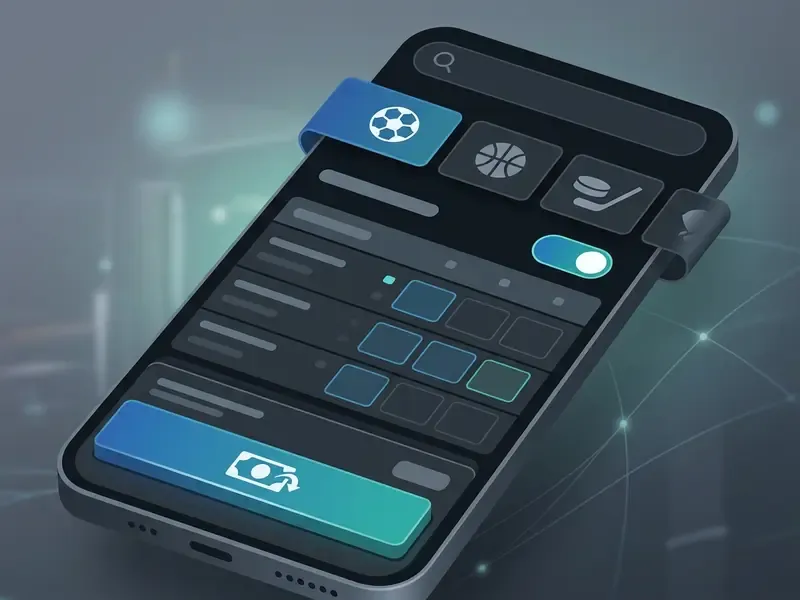
The Vave sportsbook module inside the app offers pre match and live betting options across major global leagues. Bettors navigate markets through a built-in search bar, watch real-time odds updates, use live streaming on selected events, and run cash-out directly from the mobile betting slip.

Text version of the annotations, for readers who cannot load the image: the search bar sits at the top; below it runs the sports category ribbon for football, basketball and ice hockey; a live betting toggle switches the feed to in-play; odds refresh in real time; the bet slip with the place bets and cash-out controls sits at the bottom of the screen.

Prematch and Sports Markets in the App

In the prematch section, users browse thousands of sports events across international competitions in football, basketball, ice hockey, tennis and esports. The mobile interface filters by sport, tournament or start time. Market depth includes 1X2, Asian handicaps, total goals and points, double chance and player proposition bets, plus draw no bet and team totals where the data feed supports them.

Vave sportsbook odds margins analysis, based on line evaluations across tier-1 and niche sports events:

  • Tier-1 football (top European leagues): competitive margins between 4% and 5%.
  • Mainstream sports (NBA, EuroLeague, ATP tennis): standard industry margins averaging 5% to 6.5%.
  • Niche sports and esports (darts, table tennis, CS2): higher-variance lines with margins between 8% and 10%.

Practical reading: a 4% to 5% football margin holds up against mainstream bookmakers, so tier-1 football is where the pricing edge sits. Niche betting markets at 8% to 10% cost roughly twice as much in implied commission per bet, and that compounds fast for high-frequency stakers.

Step guide: how to place bets in Vave Mobile

  • Prematch betting:
    1. Open the Vave app, tap "Sports" in the main menu, then select "Prematch".
    2. Filter by sport, football or basketball for example, or use the search bar to find your event.
    3. Tap the preferred market odds (1X2, Asian handicap) to add the selection to your slip.
    4. Open the mobile bet slip at the bottom, enter your stake in USDT or crypto, and tap "Place Bet".
  • In-play and live betting:
    1. Tap "Sports" and switch the toggle to "Live Events".
    2. Select an ongoing match marked with a play icon if you want live graphical trackers or a video stream.
    3. Tap the fluctuating odds, enter your wager amount on the pop-up slip, and confirm before the price moves.
Prematch and Sports Markets in the

Live Betting, Live Streaming, and In-Play Wagers

Disclaimer: This information is general in nature and does not replace professional advice. Live betting carries an elevated risk of impulsive decision-making, so use responsible gambling tools such as deposit limits, session reminders and self-exclusion.

The live betting section updates odds in real time as the match develops. On selected sports events, live streaming or a graphical 2D match tracker sits next to the live markets, so mobile users can follow gameplay statistics while placing in-play bets. Streaming availability is event-dependent rather than universal, and video quality scales with connection strength. Worth testing on Wi-Fi before you rely on it over mobile data.

«Massachusetts recorded 3,280 problem gambling helpline contacts in FY24, a 5% year-on-year increase; 881 calls concerned technical problems with mobile betting applications.» Massachusetts FY24 Problem Gambling Helpline Report, Massachusetts Department of Public Health (2024). https://www.mass.gov/orgs/massachusetts-department-of-public-health

Mobile devices have become the primary vector for live, high-frequency sports wagering. That is exactly why in-app self-regulation tools matter most during live events, when decisions get made in seconds.

Cash-Out and Bet Management on Mobile Devices

The mobile bet slip includes a cash-out option, letting users settle an active wager before the event ends. Offered as full or partial cash-out on qualifying pre match and live markets, the feature lets players lock in part of a potential return or limit a loss as the game shifts.

Mechanically, cash-out appears only while a bet is unsettled and pricing remains available on all selections. The offered value derives from the original selections, the prices taken, and the current in-play state. On mobile, open the My Bets or bet-slip icon to see active wagers, check the displayed cash-out figure, and confirm. The value can move or vanish between viewing and confirmation, which is normal rather than a fault.

Cash-Out and Bet Management on Mobile

«Voluntary self-exclusion requests in New York rose 68% between 2017 and 2024, with the largest single-year jump, 36%, occurring in the year mobile sports betting was legalised.» New York OASAS Addiction Data Bulletin 6, 2020 to 2024. https://oasas.ny.gov/

That trajectory is precisely why bet-management tools, cash-out, deposit limits and cooling-off periods, belong to the core product rather than to an optional extras menu.

Registration, Vave App Login, and Bonus Offers

Creating an account through Vave mobile takes a short registration process, after which users complete a Vave app login with their credentials. New players can then review available bonus offers, casino and sports welcome bonuses included, subject to specific terms and conditions.

Registration and Account Login in Vave App

To complete Vave registration on mobile:

  1. Tap the "Sign Up" button on the home screen.
  2. Enter your email address, create a strong password, and select your preferred account currency.
  3. Confirm that you are 18 years of age or older and accept the terms of service.
  4. Submit the form to finish account creation.
  5. For later sessions, tap "Login", enter your registered email and password, and use the vave login to reach your account dashboard.

Documentation differs on verification, and it is worth knowing in advance. The operator's help centre states that email verification is not required and that you can log in immediately after joining, while other app pages describe an email-link or SMS confirmation step. Expect either flow, depending on region and account risk scoring.

Registration and Account Login in Vave

Welcome Bonus, Free Spins, and Activation Terms

New registrations may opt into a welcome bonus package on a qualifying first deposit, typically a minimum deposit of 20 USDT or crypto equivalent. Offers can include a percentage match on your deposit plus free spins on selected slot games. Promotional terms may also allow a promo code at the registration or deposit step.

Vave Mobile Welcome Bonus Architecture and Limits

Bonus CategoryMatch Percentage & Max ValueWagering RolloverMax Bet LimitMax Cashout Cap
No-Deposit Registration10 Free Spins (select slots)40x spin winnings5 USDT50 USDT
Sportsbook Welcome Offer100% up to 1 BTC (or crypto equivalent)40x qualifying bets5 USDT10,000 USDT
Casino Welcome Offer150% up to 1.5 BTC + 100 Free Spins40x bonus amount5 USDT10,000 USDT

Additional published mechanics: bonus credit is usually released in instalments, free spins are typically issued in batches of 25 per day across four days, the clearance window is 30 days, and the sports bonus generally requires minimum odds in the 1.7 to 2.5 range depending on the offer version.

Worked Example: What 40x Wagering Actually Costs

Let us do the maths on a 100 USDT first deposit taking the casino offer at 150%:

  1. Bonus credited: 100 × 1.5 = 150 USDT in bonus funds.
  2. Rollover base (bonus amount × 40): 150 × 40 = 6,000 USDT of turnover required.
  3. At the 5 USDT maximum bet, that means a minimum of 1,200 qualifying spins, before variance is even considered.
  4. Expected theoretical cost at a 96.5% RTP slot: 6,000 × 3.5% ≈ 210 USDT of expected loss while clearing.
  5. Eligible games matter. Slots typically contribute 100%, while table games and live casino frequently contribute 0% or a reduced share, so live blackjack turnover may not dent the requirement at all.
  6. Even a flawless clearance run is capped at 10,000 USDT withdrawable from bonus-derived winnings, and at 50 USDT on no-deposit offers.

If the rollover were calculated on deposit plus bonus rather than bonus alone, the same deposit would require 250 × 40 = 10,000 USDT of turnover. Always confirm which base the operator applies; that single detail changes the cost by two-thirds.

Worked Example What 40x Wagering Actually

⚠️ Alert box: bonus terms and wagering verification Before opting into any welcome bonus or claiming free spins, read the full bonus terms on the official vave website. Key factors to check:

  • Wagering requirements: casino bonuses are publicly reported at rollover levels of 40x the bonus amount, and some third-party summaries cite 40x to 50x, before bonus funds convert to withdrawable cash. This figure comes from published promotional documentation and third-party reviews rather than an independently audited source, so confirm the exact multiplier and calculation base shown in your account before depositing.
  • Time limits: expiry periods, commonly 30 days with 7-day and 14-day variants reported on some offers, apply to completing wagering conditions.
  • Game weighting: slots usually contribute 100% toward rollover, whereas table games and live casino tables may contribute 0% or a reduced percentage.
  • Max bet and cashout caps: maximum bet limits, typically 5 USDT, apply while wagering active bonus funds, and winnings are capped on cashout.

«Ohio's regulations require that promotions described as "free" or "risk free" must not require the patron to risk their own money to obtain winnings.» Ohio Administrative Code Chapter 3775-16, Rule 3775-16-09, effective 26 October 2024. https://codes.ohio.gov/ohio-administrative-code/chapter-3775-16

That standard is a handy benchmark for reading any offshore promotion. If a "free" offer needs your own funds exposed before winnings become withdrawable, it is a deposit-match bonus, not a free bet.

Deposits, Withdrawals, and Support in Vave Mobile

The mobile cashier supports a range of mobile payment methods, with vave crypto rails front and centre and third-party fiat-to-crypto gateways alongside them. Mobile customer support is reachable inside the application itself.

Deposit Methods and Mobile Payment Options

Disclaimer: This information is general in nature. Availability of cryptocurrency payment methods depends on the user's jurisdiction, so confirm current terms and limits on the operator's official site. The service is intended only for adults in territories where such gambling apps are permitted.

Vave operates primarily as a crypto betting platform and, in practice, a bitcoin betting site. Supported deposit assets include Bitcoin (BTC), Ethereum (ETH), Tether (USDT on TRC20, ERC20 and Solana), Litecoin (LTC), Ripple (XRP) and Dogecoin (DOGE). For users without crypto, third-party payment options allow buying digital assets with debit cards or mobile wallets through the app interface. Minimum deposit thresholds vary by asset, for instance 5 USDT on TRC20 or the crypto equivalent.

Full supported cryptocurrency asset matrix. Vave provides native wallet architecture for 12 major digital assets: Bitcoin (BTC), Ethereum (ETH), Tether (USDT on TRC20, ERC20, Solana), Binance Coin (BNB), Ripple (XRP), Dogecoin (DOGE), Toncoin (TON), Cardano (ADA), TRON (TRX), Litecoin (LTC), Bitcoin Cash (BCH) and Bitcoin Satoshi Vision (BSV). Transactions carry no internal casino processing surcharge, and every asset listed is enabled for both deposits and withdrawals.

Vave operates primarily as a crypto

Published Minimum Deposit Thresholds

Asset / NetworkMinimum Deposit
USDT (Solana)3 USDT
USDT (TRC20)5 USDT
USDT (ERC20)19.99145606 USDT
XRP7.8 XRP
BTC / BCH0.0014965
ETH0.0109934
LTC0.03471733
TRX38.823543
DOGE42.18061233

Note the cost asymmetry. ERC20 USDT carries both a higher minimum and higher network gas costs than TRC20 or Solana rails. For small-stake players, network choice is the single largest controllable fee variable. And if you buy crypto through an in-app third-party on-ramp with a debit card, that provider's spread and processing fee apply on top of network fees. That is not a Vave charge, but it still reduces your effective deposit value.

Withdrawals and Checking Cashout Terms

Withdrawal requests go through the mobile cashier tab: select your payout currency and enter the destination wallet address. Crypto withdrawals are processed digitally, with speed depending on network block confirmations and internal security checks. The operator is reported not to charge its own withdrawal fee, although blockchain network fees are still deducted by the network.

KYC expectations: verification is not always mandatory at signup, but identity checks can be requested before larger payouts or when an account is risk-flagged. Commonly requested documents are a government ID, a selfie and proof of address. Budget time for this step before you need funds urgently, not after.

When auditing payout workflows for our operator reviews at ReelScope, we submitted a mobile test withdrawal of 100 USDT via TRC20 after standard account verification. Methodology note: in that single documented internal test, the request moved from pending to blockchain broadcast in 14 minutes and landed in the destination wallet with no internal processing fee beyond standard network gas. One observation, under specific account and network conditions, with no publicly published methodology or third-party audit. It should not be read as a guaranteed processing time for all users, assets or payout sizes.

Withdrawals and Checking Cashout Terms. Withdrawal

«Proposed New York rules define three withdrawal-request cancellations within 10 days as an automatic trigger for problem-gambling review.» New York 9 NYCRR Part 5404, Pre-proposal Responsible Gaming Memo (2026). https://oasas.ny.gov/

Repeatedly cancelling a pending withdrawal to keep playing is treated by regulators as a behavioural warning sign. A useful self-check, whichever jurisdiction licenses your operator.

Customer Support, Live Chat, and Responsible Gambling

Customer support service is available 24/7 through an in-app live chat widget or email (support@vave.com). Representatives handle technical queries, account verification and payment tracking. The operator's help centre describes 24/7/365 live chat with replies typically inside several minutes, and directs formal complaints to complaints@vave.com. Responsible-gaming actions, account limits, cooling-off and self-exclusion, are requested through that same live chat channel rather than a self-service settings page, which is weaker than the UKGC standard British players are used to.

«Michigan logged 4,543 gambling helpline contacts in 2024, up 16% year on year; 2,559 of them involved questions about online gaming platforms.» Michigan 2024 Gambling Helpline Annual Report, FY2024. https://www.michigan.gov/mdhhs

The volume of platform-specific queries in that data is a reminder: test support responsiveness on a low-stakes question before you ever need help with a disputed balance.

Vave App FAQ

Is the Vave App available on Google Play or the App Store?

For the overwhelming majority of regions, no. Android access runs through a direct APK download from the official site, and iOS access through a Safari "Add to Home Screen" web app. Limited regional App Store listings have been reported, but do not assume the Play Store route is available in yours.

Is Vave licensed by the UK Gambling Commission?

No. Vave operates under an offshore licence, Curaçao with Anjouan authorisation reported, and the United Kingdom is a restricted territory. UK players do not receive UKGC consumer protections.

Does Vave work with GAMSTOP?

No. GAMSTOP covers UKGC-licensed operators only. If you are self-excluded through GAMSTOP, use device-level blocking software and contact the National Gambling Helpline rather than looking for offshore alternatives.

Is KYC required to withdraw cryptocurrency?

Not always at registration, but verification can be requested before larger or flagged withdrawals. Expect to supply ID, a selfie and proof of address.

Does the Vave App charge withdrawal fees?

The operator is reported to add no internal processing surcharge. Blockchain network fees still apply and vary by asset and network, with TRC20 and Solana typically cheaper than ERC20.

How much do I need to wager to withdraw a bonus?

At the reported 40x rollover on the bonus amount, a 150 USDT bonus requires 6,000 USDT of qualifying turnover inside 30 days, with a 5 USDT max bet and slots weighted at 100%.

Does the app support push notifications?

Only where the operating system and installation method permit. Native APK installs support them, web app installs are limited by browser policy, and the plain mobile website does not.

Can I use the same account for sports and casino?

Yes. A single wallet and login covers the sportsbook, live betting, casino and live dealer sections.